
Smart Design System
Build a Design System that doesn’t just look good,
but actually works for your product.
Practical workshop (one day in person and two virtual afternoon sessions) for upgrading your Figma design system to the AI era (transforming it from traditional style-based to variable and token-based = MCP ready).
10.11.26 | 9:00-17:00 (In Person)
12.11.26 | 14:00-17:00 (On Line)
17.11.26 | 14:00-17:00 (On Line)
Wework, 8 Devonshire Square, London EC2M 4YJ
790$ 590$
Growth
Focus
Impact
About the Workshop
A hands-on workshop for building a smart Design System powered by Tokens, Variables and a structured methodology.
During the workshop, you’ll learn how to turn your Design System from a component library into real product infrastructure, enabling teams to move faster, maintain consistency, improve collaboration between Design and Development, and prepare the product for smarter workflows using AI and Figma MCP.
In this workshop, we will learn how to build a Smart Design System based on Variables and Tokens.
We will work with an existing product, transform it into a more scalable Design-to-Dev workflow, and prepare the product for smarter work with AI tools and Figma MCP.
This is a practical hands-on workshop. Participants will work on their own existing product file and begin building its foundation, based on the methodology and insights developed by ProductX.Biz.
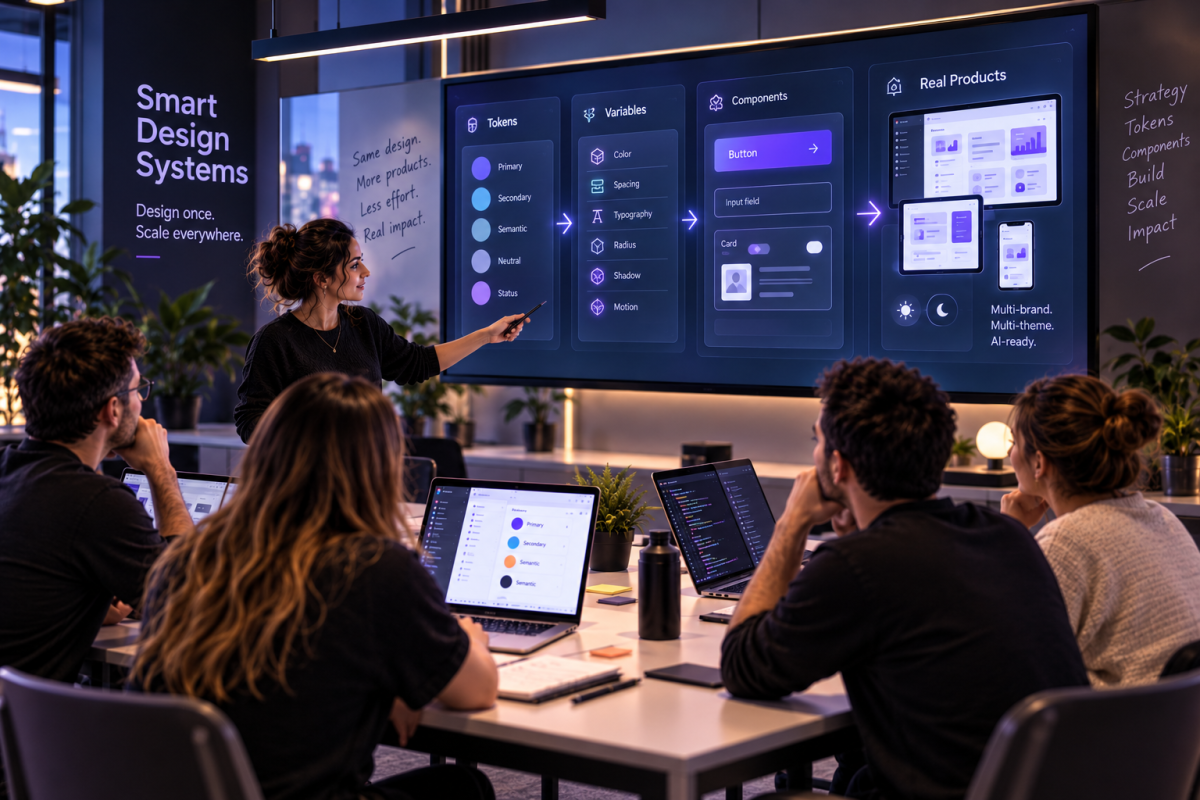
Why Now?
More and more Product, Design and Engineering teams are realising that a Design System can no longer remain just a component library.
Working effectively with Tokens, Variables, scale, themes, responsiveness and AI tools requires a well-structured foundation and a clear methodology.
This workshop is designed to teach you not only what to build, but also how to scale it correctly, what to tackle first, and how to create a foundation your team can continue building on.
Learn from experienced practitioners
Learn from ProductX.biz’ accumulated experience across real-world projects involving the creation, upgrade and migration of Design Systems for complex products and organisations.
Modern methods
Learn how to work with Tokens, Variables and scalable structures that enable you to build a smarter, more flexible and more reliable Design System — ready for AI and Figma MCP workflows.
Focus on complex products
Learn how to approach products with multiple screens, states and complex Design-to-Dev requirements, and turn the process into a structured and manageable workflow.
Hands-on practice
The workshop is built around practical work: mapping the system, creating Primitives and a Semantic Layer, connecting components and applying the methodology to a real product.
Who Is It For?
- Product Designers and UX/UI Designers who want to build or upgrade a Design System within their organisation.
- Design System Designers and Leads who want to deepen their knowledge of Variables and Tokens.
- Product Managers and Design/Development leaders who are responsible for scalable product infrastructure.
- Teams that are beginning their migration to Variables.
- Organisations looking to prepare their product infrastructure for smarter collaboration between Design, Development and AI tools.
What do you need to participate?
To get the most value from the workshop, please come prepared with:
- A paid Figma account
- An existing product file in Figma
- At least 5 representative screens from the product
- Ideally, a product that already has a partial Design System, Style Guide, or existing component library
- A paid Claude account (required for the AI-focused activities)
What You'll Take Away
A hands-on foundation for building a Smart Design System
The first day focuses on building the core foundation: an introduction to Smart Design Systems, working with our template, focused mapping, Primitives, the Semantic Layer, and connecting a key component to Variables.
- Applying the ProductX.Biz methodology as a starting point.
- Introduction to Variables, Tokens & Figma MCP
- Getting familiar with our template
- Mapping screens and components
- Building Primitives
- Building the Semantic Layer
- Connecting a key componen
By the end of the day, you’ll leave with a practical foundation for a basic Design System built around your own real product.
In the two on line sessions we continue expanding the system: building a connected screen, working with Modes and Themes, Responsiveness, Documentation, Dev Hand-Off, and using your Design System with AI and Vibe Coding tools.
- Build your first screen connected to the system
- Documentation & Dev Hand-Off
- Using your Design System with AI & Vibe Coding tools
- Modes, Themes & Responsiveness
- Migration Roadmap for continued implementation across the organization
By the end of the workshop you’ll leave with a broader foundation, a clear understanding of how to scale it, and a framework for continuing the migration across your organization.
Variables & Tokens
Semantic Layer & Primitievs
Modes & Responsiveness
What You'll Take Away
Smart Design System Architecture
Learn how to structure your Design System beyond components, creating clear layers between primitives, semantic decisions and reusable product patterns.
Variables & Tokens
Build a scalable Variables and Tokens architecture that supports consistency, themes, modes and future product growth.
Semantic Layer
Learn how to translate raw design values into meaningful semantic decisions that can be understood and reused across Design and Development.
Design-to-Dev Infrastructure
Create a clearer connection between your Design System and front-end implementation, reducing ambiguity and making handoff significantly more scalable.
Modes & Responsiveness
Learn how to build infrastructure that supports different modes, themes, breakpoints and responsive product behaviour.
AI-Ready Design Systems
Understand how structured Design Systems can become the foundation for AI-assisted design, Figma MCP and Vibe Coding workflows.
Product Strategy Definition Framework
Product Strategy Toolkit
Competitive Analysis Framework
Agenda
Day 1
09:00 - Arrival & Refreshments
(30 minutes)
Introduction: Why Smart Design Systems
(30 minutes)
The problem, the shift from Styles to Variables/Tokens, product value, scalability, AI, and Figma MCP
Introducing the Template
(30 minutes)
Walkthrough of the template structure: Mapping, Primitives, Semantic, Components, Screens, Documentation
Template & File Setup
(30 minutes)
Every participant will have access to the files and the ability to run the agents.
Coffee Break
(15 minutes)
In-depth strategic analysis of a well-known product from inception to current state, examining key strategic decisions and their outcomes.
Focused Mapping
(60 minutes)
Identify recurring components, colors, states, duplications, and gaps in the screens prepared in advance 15 min explanation + 45 min hands-on practice"
Primitives
(60 minutes)
Start building the raw-material layer: Colors, Spacing, Radius, Typography 15 min explanation + 45 min hands-on practice
Lunch Break
(45 minutes)
Semantic layer
(75 minutes)
Move from Primitives to semantic values: Brand, Surface, Text, Border, Action, State, Severity
Core Component
(75 minutes)
Choose a simple component such as a Button, Input, or Card and connect it to Variables. If time allows, begin a more complex component
Wrap-up & Next Steps
(30 minutes)
On Line Session #1
Build a Connected Screen
(90 minutes)
Complete the components and build a screen
Modes & Responsiveness
(90 minutes)
Create two modes / brands and define responsive behavior
On Line Session #2
Documentation & Dev Hand-Off
(30 minutes)
Complete the components and build a screen
Migration to Vibe Coding Tools
(1:45 minutes)
Wrap-up & Next Steps
(30 minutes)
About us
ProductX – where innovation and exceptional product management converge.
Welcome to ProductX, a company focused on developing innovative solutions for complex systems, B2B environments, and product management. Driven by a passion for impactful products, we transform ideas into exceptional user experiences. Our expert team blends UX/UI design, development, and product strategy to create seamless, valuable products. At ProductX, we prioritize collaboration and long-term partnerships, working closely with clients to understand their vision and goals.
About Adi Admoni
Adi is a senior product designer with 5 years of experience. AI has been part of Adi’s design practice for the past 2.5 years, changing not only how Adi work, but also how Adi think about designing digital products
Among the clients Adi has worked with:
- Playtika
- Afifi
- Palo Alto
- Greenroad

Our Customers
UI has over 1500 customers from a wide variety of content worlds.
Over 70% of all our customers are return customers, executing their second and third projects with us.